Implementing single node, multiple processes LLM training
Training a Python code generator using single node mulitple processes
0. Introduction
This passage is based on a project form the book Natural Language Processing with Transformers, Chapter 10: Training Transformers from Scratch. The content describes the whole process of training a python code generating model on a remote server and montoring the training parameters on WandB.
1. Resources
The dataset and the model are from the book Natural Language Processing with Transformers, Chapter 10: Training Transformers from Scratch.
https://huggingface.co/transformersbook/codeparrot-small
Installation of GPU driver refers to this document:
https://docs.google.com/document/d/1BXB90aixWiKry0Qmk-g2PfxdIlJcib_wntOFbqlxnHw/edit
2. The training environment
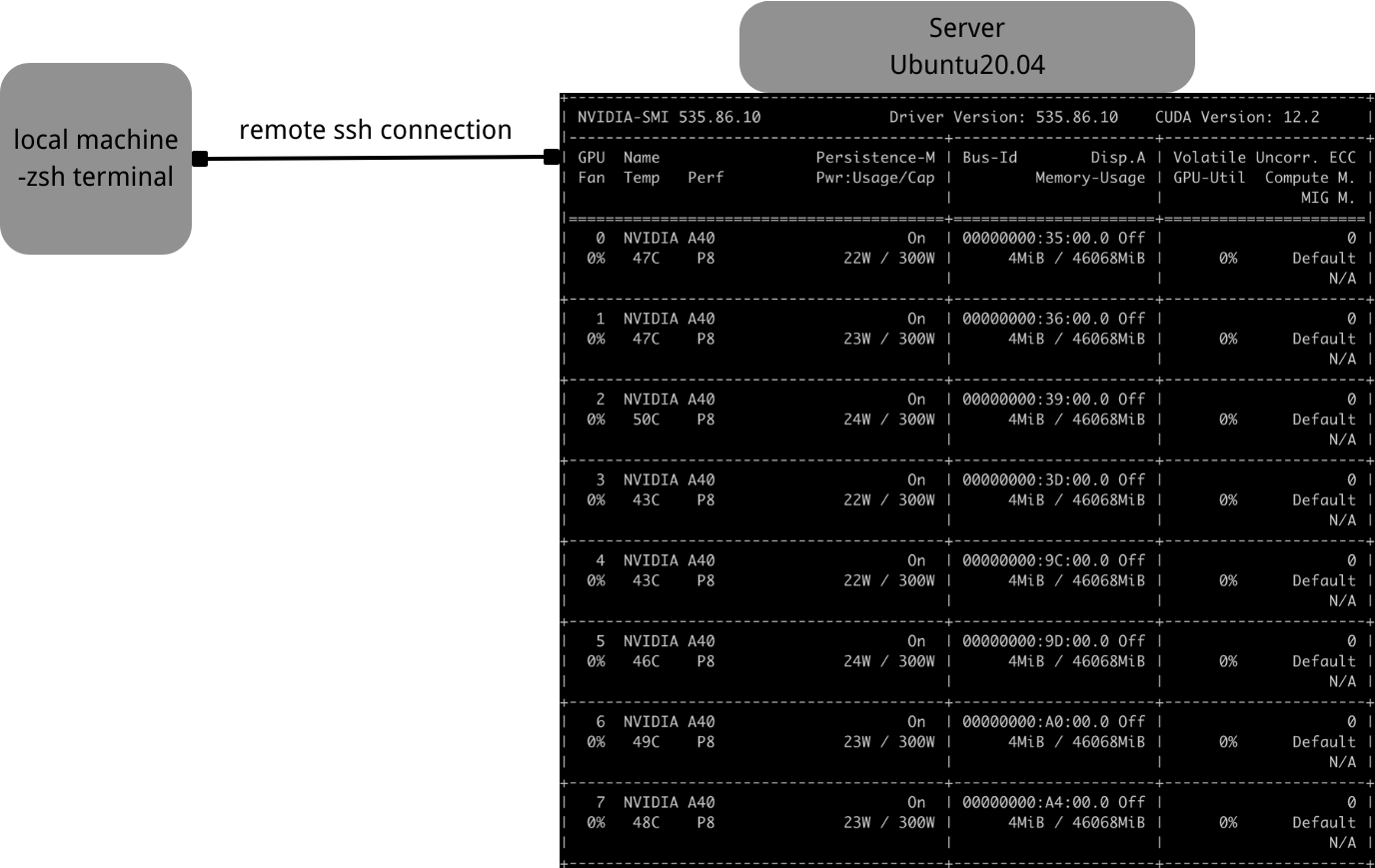
GPU driver: cuda-keyring_1.0-1
Virtual environment: conda 23.5.2
Requirements: python==3.10.2
wandb==0.15.8
tensorboard==2.12.3
tensorboard-data-server==0.7.1
huggingface-hub==0.16.4
transformers==4.16.2
datasets==1.16.1
accelerate==0.5.1
2. Training process
Connect to the remote server.
With password:(base) gong208@bogon ~ % ssh clouduser@61.241.103.39 -p 10053
Without password:(base) gong208@bogon ~ % cd .ssh(base) gong208@bogon .ssh % ssh-keygen #generates a public key and private key(base) gong208@bogon .ssh % ssh-copy-id -p 10053 clouduer@61.241.103.39 #saves the public key under /.ssh directory of the server
Connect using proxy:(base) gong208@bogon ~ % ssh -R 7890:127.0.0.1:7890 -p 10053 clouduser@61.241.103.39(base) clouduser@ubuntu:~$ export HTTP_PROXY=http://127.0.0.1:7890 HTTPS_PROXY=http://127.0.0.1:7890Download the model and required dependencies
Clone the model codeparrot-small from huggingface using git clone.
Create a virtual environment with python3.10.2 using Conda. (env) in the following passage means to run the code in the virtual environment.
In the environment, install the dependencies in the requirements.txt file from the model directory:(env) ~/codeparrot-small$ pip install -r requirements.txtproblem you may encounter:
You may find that the requirements.txt file refers to the newest version of some dependencies, which may cause potential crashes, so you can download using pip and specify the version.
You may have to use pip mirror install in China, for example(env) ~/codeparrot-small$ pip install -i https://mirrors.aliyun.com/pypi/simple/ --trusted-host=mirrors.aliyun.com "tensorboard==2.12.3"
All the dependencies and their versions are listed below:
wandb==0.15.8
tensorboard==2.12.3
tensorboard-data-server==0.7.1
huggingface-hub==0.16.4
transformers==4.16.2
datasets==1.16.1
accelerate==0.5.1
3. Training configuration
Since the training script uploads the metrics to WandB, we can log in Wandb before training to receive training information afterward. The training is launched through accelerate. To enable Data Distributed Parallelism, we have to set up some configurations before training:~/codeparrot-small$ accelerate config
- Compute environment: This machine
- Which type of machine: multi-GPU
- How many machines will you use: 1
- Use DeepSpeed? NO
- How many processes in total: 8
- Use FP16? yes
This configuration is for a single node (one machine) eight processes (8 GPUs) training.
With the configuration, we can now try to start the training process. Since it would last for a long time (about 1.5 days for the small model), running the process in tmux is advisable so the training can run in the background.~/codeparrot-small$ tmux
If you want to detach from the tmux session, press ‘ctrl+b’ then press ‘d’. If you want to end the session, type exit.
4. Launching the training process
Then we can launch the training script through accelerate:(env) ~/codeparrot-small$ accelerate launch codeparrot_training.py
To better record the errors that arise, we can add another piece of code:(env) ~/codeparrot-small$ accelerate launch codeparrot_training.py 2>&1 | tee log.txt
, which saves the return information in log.txt.
#problems you may encounter:
The program may report failing to find the datasets. The most direct solution is to download the dataset from huggingface.~$ git lfs install~$ git clone https://huggingface.co/datasets/transformersbook/codeparrot-train~$ git clone https://huggingface.co/datasets/transformersbook/codeparrot-valid
Make sure that the dataset_name is set to ‘../codeparrot’ so that the script can locate the downloaded dataset.
There’s an error in the Python script. In line 82, under the valid_data attribute, change the split parameter from ‘train’ to ‘validation’.
Delete the error_bad_chunk=False argument in line 78 and line 83, or they may cause a syntax error.
Implementing single node, multiple processes LLM training
http://gong208.github.io/2023/08/16/2023-08-16-single-node-multi-processes/