Wechat Devtool 1

  1. Wechat Miniapplication:

Wechat Miniapplication is literally an application based on Wehcat. Different from ordinary applications, it is said that these miniapplications can be used without downloading & installing. In fact, it is because they have a very small size (less than 2M) so that the users won’t be aware of the process of downloading.

  1. Wechat developer tool: a specially designed IDE for wechat miniapplications.

  2. The regular code structure of a miniapplication:

pages It is recommended to create all the codes for each page of the application in this folder.
  log
This is an example folder for a log page in the application. In a page folder, there will usually be four files:

log.js: .js file is responsible for the logical components of the page. Using javascript, developers can bind events to a button, pass parameters, etc.

log.json: I haven't worked much about the .json files so far. As far as I know, it is resonsible for the page's "setup": page title, text style, background color...

log.wxml: .wxml is derived from html. It sues a language syntax similar to html to create elements like `<view></view>`, `<button></button>` on the page.

log.wxss: wxss is derived from css. It works similarly. I use it to arrange the elements shown on the page, like position and flex display.

utils util.js
app.js app.js file is responsible for the global logic. The APP() in it is the start point of the overall application code.
app.json A page can be displayed only after you add the link of the page into this file. app.json is responsible for the global setup. For example, you can set the primary background color or add the tab bars.
app.wxss app.wxss works the same as the .wxss files of the pages, but it influences globally. The page wxss arrangement is prior to the global arrangement.
project.config.json This file contains the settings of a miniapplication project.
sitemap.json

Winter Holiday Vail, Colorado

Arriving at Vail, Colorado!

2022.12.16


Heavy snow covered the fields in Denvor!
IMG_0728
First night at Vail Resort. It was fantastic with all neon lights glowing.
IMG_0734

Practicing on introductory skiing skills

2022.12.17


Since I’d skied for once before, I mastered the “snow plough” pretty quickly.

snow plough is a elementary skiing skill. It helps to slow down by pushing the back of both skis out, or make a turn by pushing the back of one of the skis.

Learning higher level skills and “adventure” in the mountain

2022.12.18~2022.12.21
To be able to ski on steeper slopes, I had to learn the “parallel turning”, which would slow down and turn more effectively.
I practiced on a relatively gentle slope for two days.
Here are some tips:

  1. Put most of the weight of the body forward (downhill) so that the body won’t fall to the slope;
  2. While making a parallel turn, put more weight on the ski downhill, it is then easier to make the ski uphill parallel to the one downhill.
  3. Look forward and make sure that you cannot see the tips of your skis, or your weight may be lagging behind, leading to a fall.

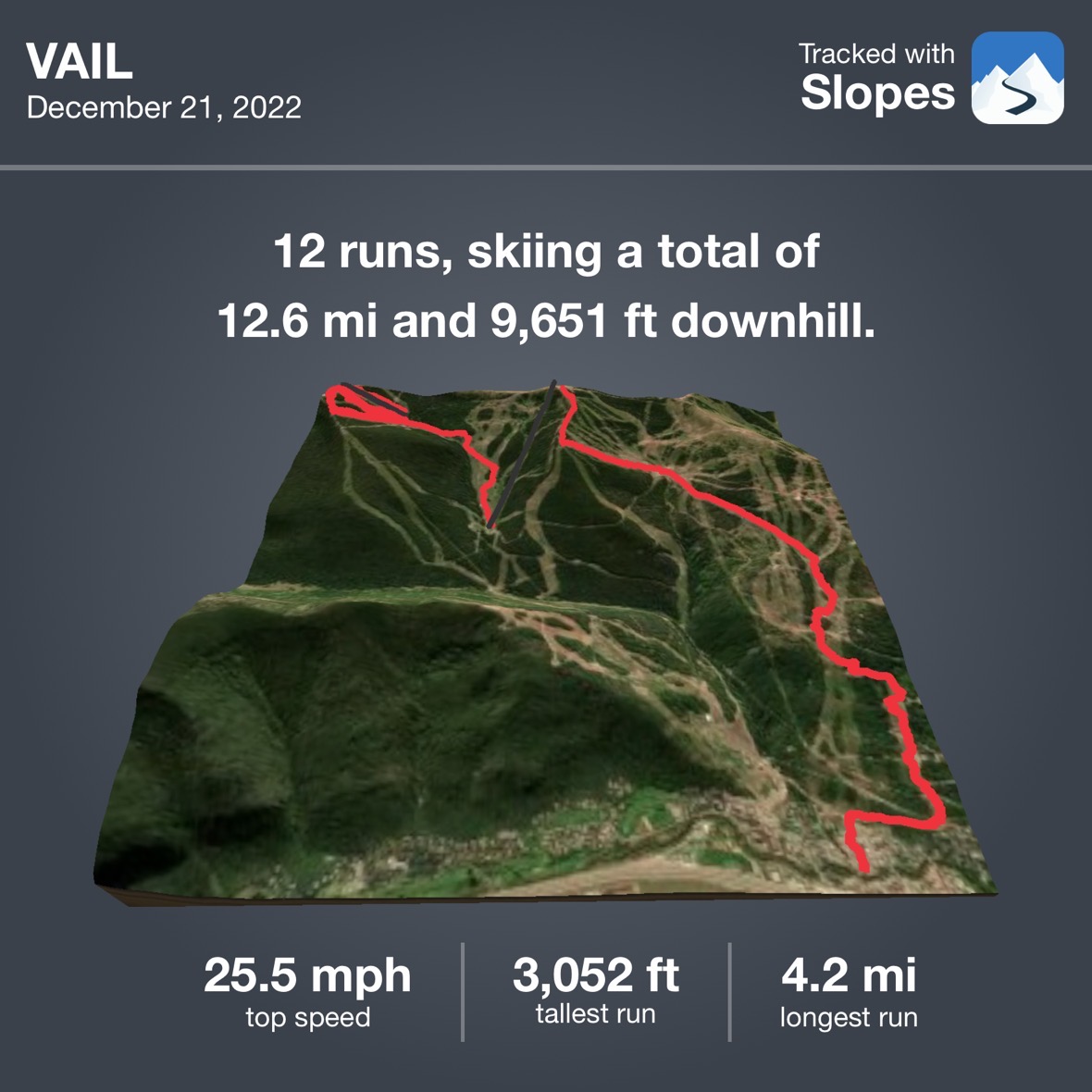
On 2022.12.21, I rode the chairlift to a top of the mountain and skied all the way down. There were some slip-overs but I did feel a sense of achievement!

IMG_0853
IMG_0821

For more pictures, go to image gallery

Gong's Dish -- braising eggplant

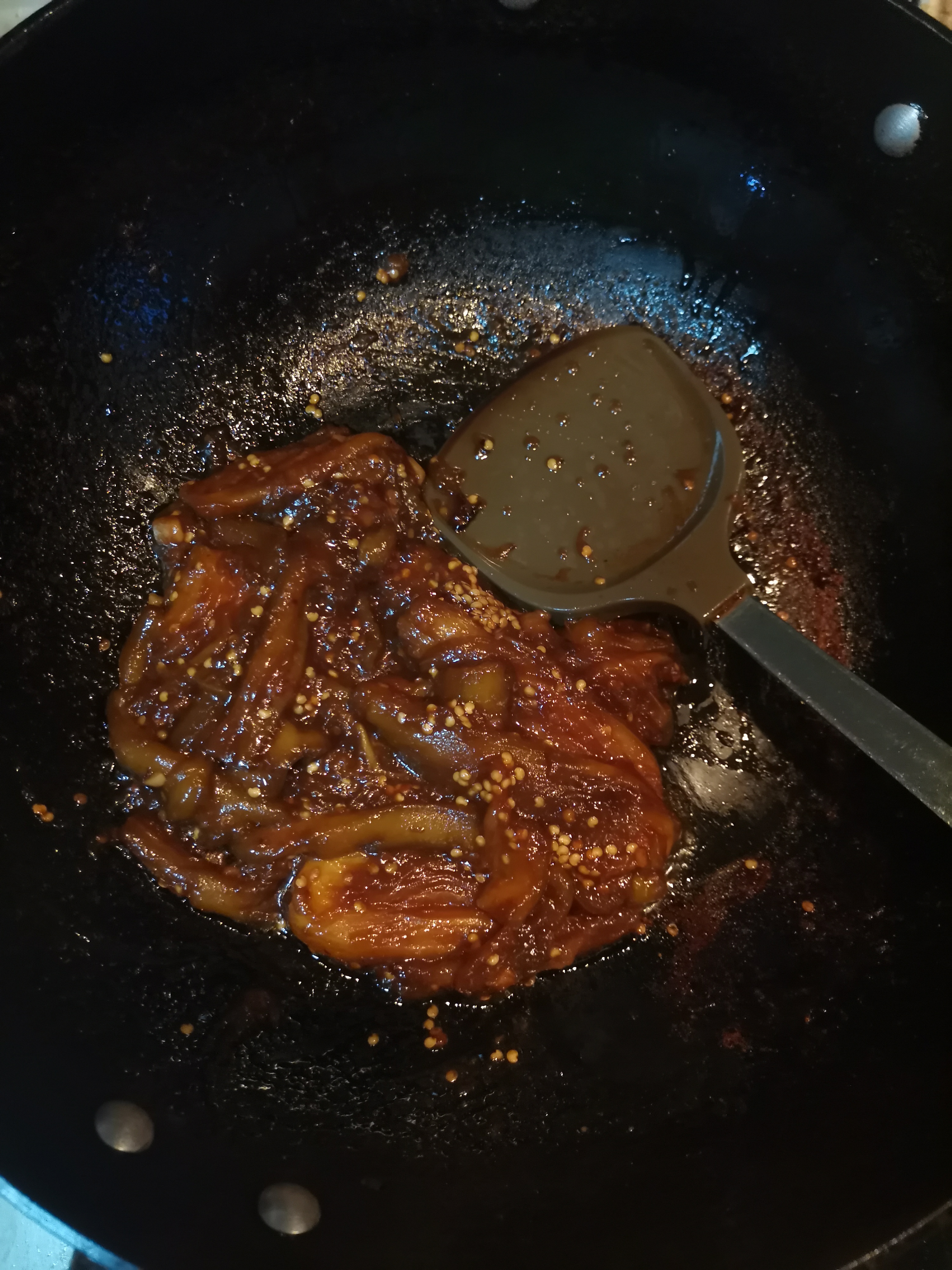
My first specialty dishes: Braising eggplant…
微信图片_20220729195140
Even thoug it doesn’t look very tasty, it is really delicious especially when you eat it with rice.
Cookbook:

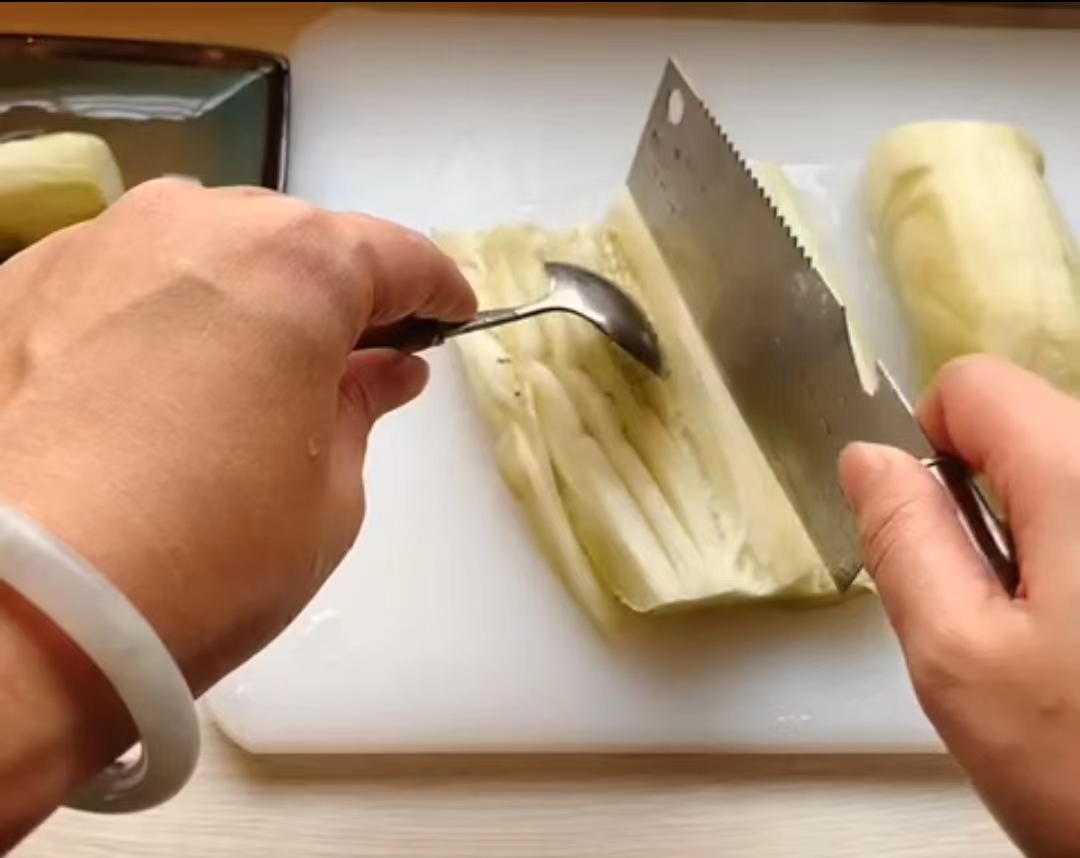
  1. Peel the eggplant and “spread” it like this:
    微信图片_20220729195931
    In this way the dish won’t look that messy.
  2. Then steam the eggplant for about 15 min.
  3. As for the sauce, there are two versions:
    _ For the light version,
    soy sauce 2 spoons
    oyster sauce 1 spoon
    rice wine 1 spoon
    dark soy sauce 1 spoon (or less)
    honey 1 spoon
    white sugar, salt depends
    Starch water 1 bowl
    _ For the heavy flavor version,
    soy sauce 2 spoons
    oyster sauce 1 spoon
    dark soy sauce 1 spoon (or less)
    honey 1 spoon
    white sugar, salt depends
    Coca Cola (NO PEPSI, thanks!) 1 bowl
  4. Fry the eggplants until they turn burnt yellow (I haven’t succeeded frying eggplants into this color, maybe I should add more oil?).
  5. Add the sauce into the pan, and stew it for some time over high heat to thicken the sauce.
  6. FINISHED

屏幕截图 2022-07-29 202452

さ、やてみろ!

Inserting multiple rows using executemany command in mysql

While creating a table in a database, a row marked as “AUTO_INCREMENT” is necessary for multiple inserting:

1
2
3
4
5
6
7
8
CREATE TABLE university (
id int(8) NOT NULL AUTO_INCREMENT,
#without AUTO_INCREMENT, there will be an error while inserting multiple rows
name varchar(50) NOT NULL,
university varchar(50) NOT NULL,
major varchar(50) NOT NULL,
PRIMARY KEY (id)
) ENGINE=MyISAM AUTO_INCREMENT=1 DEFAULT CHARSET=utf8;

Then, create an array of the tuples you want to insert:

1
2
3
4
5
6
data = [("abc",'四川大学','口腔医学'),
("def",'北京师范大学','教育学类'),
("ghi",'北京工业大学','数学类'),
("jkl",'北京邮电大学','电子信息'),
("mno",'北京理工大学','未来精工技术'),
]

And use executemany command to insert:

1
2
3
4
5
6
7
8
9
try:
# 执行sql语句,插入多条数据
cursor.executemany("insert into university(name, university, major) values (%s, %s, %s)" , data)
# 提交数据
db.commit()
except:
# 发生错误时回滚
db.rollback()
print('error')

lines about connecting to database and ceating cursor instance is ignored

Creating a virtual machine (ubuntu) with virtual box

Yesterday, I created a virtual machine for ubuntu system using VirtualBox.

  1. Download the iso file of the operating system:
    ubuntu.iso
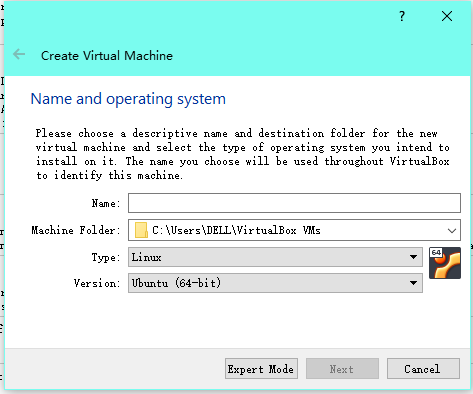
  2. Open VirtualBox, then choose the corresponding operating system:
    VirtualBox1
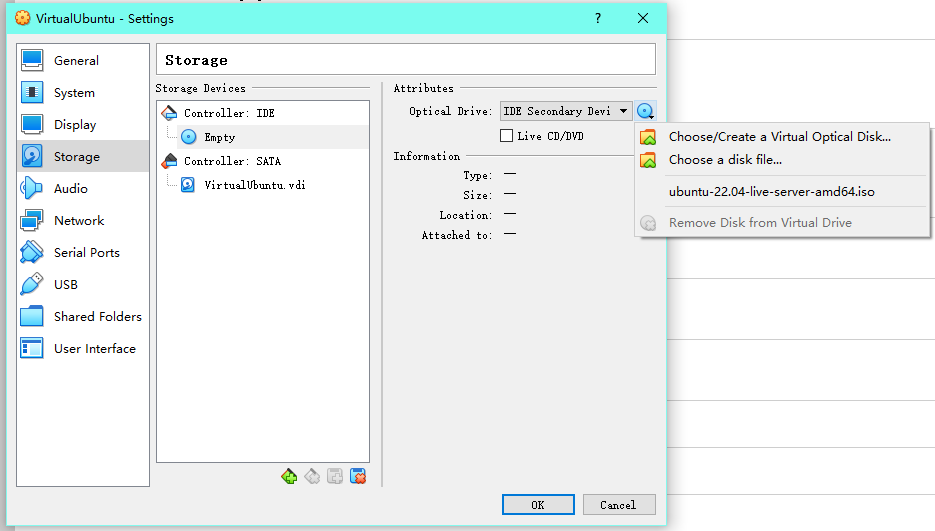
  3. Mount the iso file on VirtualBox:
    VirtualBox
  4. Format the disk space.
  5. Complete the regular settings.
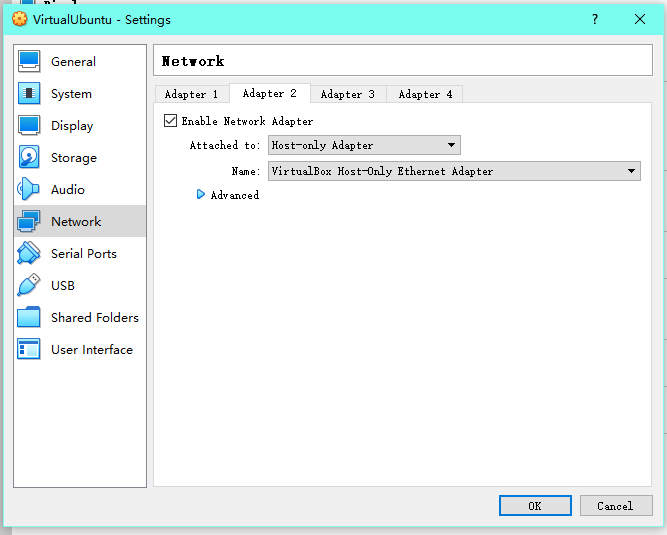
  6. Set network adapters:
    _ there can be multiple adapters
    _ For my virtual machine, one adapter is used for NAT, the other one is used to connect to the host through ssh
    image
  7. remotely connect to the virtual machine through ssh:
    On host system, search for folder .ssh . There should be a public key id_rsa.pub .
    Then open it either using
    1
    cat id_rsa.pub
    or
    1
    vim id_rsa.pub
    Switch to the virtual machine, again, find .ssh folder and open it with
    1
    vim authorized_keys
    and paste the public key to the file, then save and close the file with
    1
    :wq [ENTER]
  8. Use
    1
    ip a
    to chech the ip address of the virtual machine, and connect to the virtual machine through ssh remotely.

image gallery constructed

Agian, I moved a step forward to mastering markdown by using skilfful copy-pasting.

Pages
log folder
log.js
log.json
log.wxml
log.wxss

Testing the images

chisato

url: /assets/chisato.jpg

chisato

url: https://user-images.githubusercontent.com/60023638/177815981-3059b9b2-8228-492e-bc63-2c3d592643e3.jpg

I tried to make the picture shown as part of the title of this post, which can then be displayed on homepage fo the website, and failed.
another thing worth to mention here is that, the first picture is first uploaded to the assets directory and then refered in this file. In this way, it has to be refered using a relative link. I know the first picture fails to display when you check this file on github, but it works on my website.
and the second is directly uploaded to this file, which works well as usual.

Mastering the website?!

As you can see, I’ve successfully created a ‘category’ page (basically copy-pasting from others’ work though).
And here I’m trying to upload the first picture of my website:
5dedfb1f3a292df5e335e5c0f9315c6035a87370
looks good.

A brand new site looks awkward

Finally I make it, though it embodies a total simplism. Well, it’s fine as long as it is useful… What’s the pupose of this website anyway?

I've passed the Subject 2 exam

Congratulations!! I’m heading to Subject 3 at 60km/h hahaha…