While creating a table in a database, a row marked as “AUTO_INCREMENT” is necessary for multiple inserting:
1 2 3 4 5 6 7 8
CREATE TABLE university ( id int(8) NOT NULL AUTO_INCREMENT, #without AUTO_INCREMENT, there will be an error while inserting multiple rows name varchar(50) NOT NULL, university varchar(50) NOT NULL, major varchar(50) NOT NULL, PRIMARY KEY (id) ) ENGINE=MyISAM AUTO_INCREMENT=1 DEFAULT CHARSET=utf8;
Then, create an array of the tuples you want to insert:
1 2 3 4 5 6
data = [("abc",'四川大学','口腔医学'), ("def",'北京师范大学','教育学类'), ("ghi",'北京工业大学','数学类'), ("jkl",'北京邮电大学','电子信息'), ("mno",'北京理工大学','未来精工技术'), ]
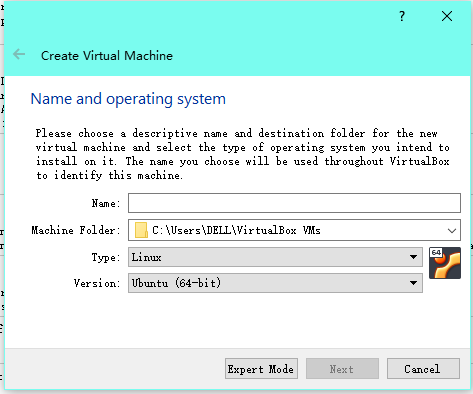
Yesterday, I created a virtual machine for ubuntu system using VirtualBox.
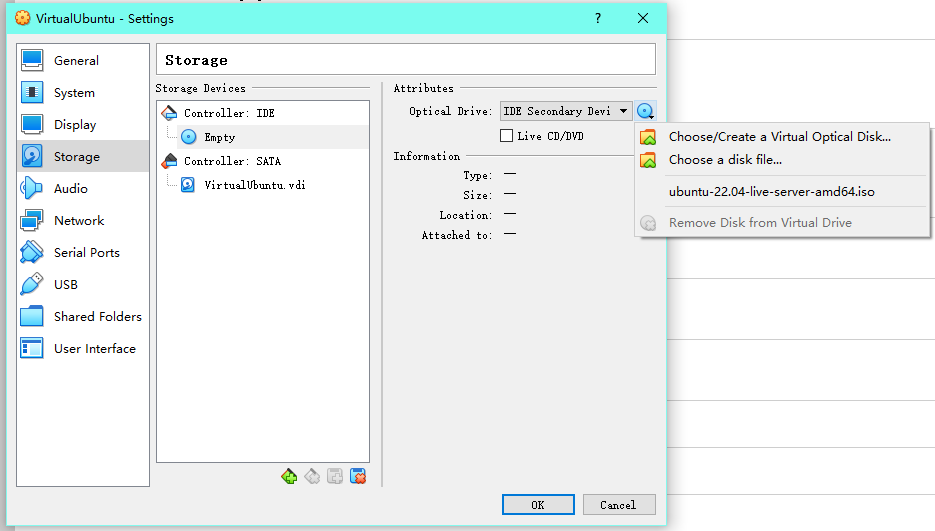
Download the iso file of the operating system:
Open VirtualBox, then choose the corresponding operating system:
Mount the iso file on VirtualBox:
Format the disk space.
Complete the regular settings.
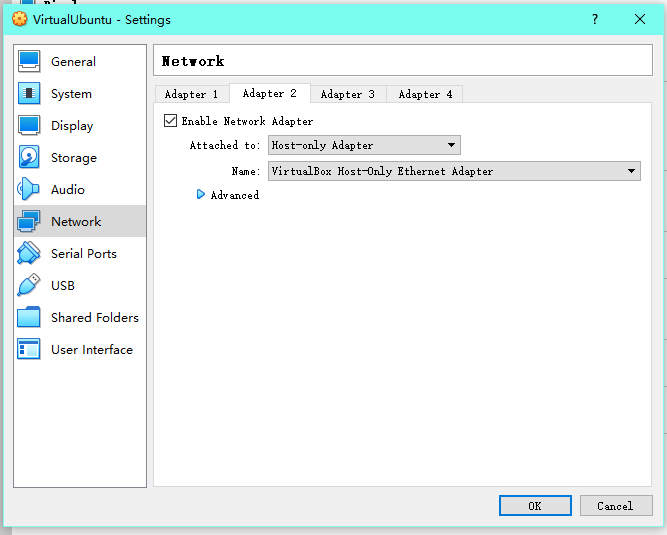
Set network adapters: _ there can be multiple adapters _ For my virtual machine, one adapter is used for NAT, the other one is used to connect to the host through ssh
remotely connect to the virtual machine through ssh: On host system, search for folder .ssh . There should be a public key id_rsa.pub . Then open it either using
1
cat id_rsa.pub
or
1
vim id_rsa.pub
Switch to the virtual machine, again, find .ssh folder and open it with
1
vim authorized_keys
and paste the public key to the file, then save and close the file with
1
:wq [ENTER]
Use
1
ip a
to chech the ip address of the virtual machine, and connect to the virtual machine through ssh remotely.
Posted Updated Lifea few seconds read (About 25 words)
I tried to make the picture shown as part of the title of this post, which can then be displayed on homepage fo the website, and failed. another thing worth to mention here is that, the first picture is first uploaded to the assets directory and then refered in this file. In this way, it has to be refered using a relative link. I know the first picture fails to display when you check this file on github, but it works on my website. and the second is directly uploaded to this file, which works well as usual.
Posted Updated Lifea few seconds read (About 57 words)
As you can see, I’ve successfully created a ‘category’ page (basically copy-pasting from others’ work though). And here I’m trying to upload the first picture of my website: looks good.
Posted Updated Lifea few seconds read (About 28 words)
I haven’t expected to meet another problem since I struggled to create the website 10min ago. The thing is the description of the posts cannot be displayed, which means my complaints in this post cannot be displayed neither. But I’m still writing to curse this whole pile of not-looking-good codes, which does no good.